IQR Demo Application
Interactive Query Refinement or “IQR” is a process whereby a user provides one or more exemplar images and the system attempts to locate additional images from within an archive that a similar to the exemplar(s). The user then adjudicates the results by identifying those results that match their search and those results that do not. The system then uses those adjudications to attempt to provide better, more closely matching results refined by the user’s input.

SMQTK IQR Workflow
Overall workflow of an SMQTK based Interactive Query Refinement application.
The IQR application is an excellent example application for SMQTK as it makes use of a broad spectrum of SMQTK’s capabilities.
In order to characterize each image in the archive so that it can be indexed, the DescriptorGenerator algorithm is used.
A NearestNeighborsIndex algorithm is used to understand the relationship between the images in the archive and a RelevancyIndex algorithm is used to rank results based on the user’s positive and negative adjudications.
SMQTK comes with a pair of web-based application that implements an IQR system using SMQTK’s services as shown in the SMQTK IQR Workflow figure.
Running the IQR Application
The SMQTK IQR demonstration application consists of two web services: one for hosting the models and processing for an archive, and a second for providing a user-interface to one or more archives.
In order to run the IQR demonstration application, we will need an archive of imagery. SMQTK has facilities for creating indexes that support 10’s or even 100’s or 1000’s of images. For demonstration purposes, we’ll use a modest archive of images. The Leeds Butterfly Dataset will serve quite nicely. Download and unzip the archive (which contains over 800 images of different species of butterflies).
SMQTK comes with a script, iqr_app_model_generation, that computes the descriptors on all of the images in your archive and builds up the models needed by the NearestNeighborsIndex and RelevancyIndex algorithms.
usage: iqr_app_model_generation [-h] [-v] -c PATH PATH -t TAB GLOB [GLOB ...]
Positional Arguments
- GLOB
Shell glob to files to add to the configured data set.
Named Arguments
- -v, --verbose
Output additional debug logging.
Default: False
- -c, --config
Path to the JSON configuration files. The first file provided should be the configuration file for the
IqrSearchDispatcherweb-application and the second should be the configuration file for theIqrServiceweb-application.- -t, --tab
The configuration “tab” of the
IqrSearchDispatcherconfiguration to use. This informs what dataset to add the input data files to.
The -c/--config option should be given the 2 paths to the configuration files for the IqrSearchDispatcher and IqrService web services respectively.
These provide the configuration blocks for each of the SMQTK algorithms (DescriptorGenerator, NearestNeighborIndex, etc.) required to generate the models and indices that will be required by the application.
For convenience, the same configuration files will be provided to the web applications when they are run later.
The SMQTK source repository contains sample configuration files for both the IqrSearchDispatcher and IqrService services.
They can be found at smqtk_iqr/web/search_app/sample_configs/runApp.IqrSearchDispatcher.json and smqtk_iqr/web/search_app/sample_configs/runApp.IqrService.json respectively.
The iqr_app_model_generation script is designed to run from an empty directory and will create the sub-directories specified in the above configurations requires when run.
Since these configuration files drive both the generation of the models and the web applications themselves, a closer examination is in order.
Present in both configuration files are the flask_app and server sections which control Flask web server application parameters.
The runApp.IqrSearchDispatcher.json contains the additional section mongo that configures the MongoDB server the UI service uses for storing user session information.
 1{
 2    "flask_app": {
 3        "BASIC_AUTH_PASSWORD": "demo",
 4        "BASIC_AUTH_USERNAME": "demo",
 5        "SECRET_KEY": "MySuperUltraSecret"
 6    },
 7    "iqr_tabs": {
 8        "LEEDS Butterflies": {
 9            "data_set": {
10                "smqtk_dataprovider.impls.data_set.memory.DataMemorySet": {
11                    "cache_element": {
12                        "smqtk_dataprovider.impls.data_element.file.DataFileElement": {
13                            "explicit_mimetype": null,
14                            "filepath": "models/image_elements.dms_cache",
15                            "readonly": true
16                        },
17                        "type": "smqtk_dataprovider.impls.data_element.file.DataFileElement"
18                    },
19                    "pickle_protocol": -1
20                },
21                "type": "smqtk_dataprovider.impls.data_set.memory.DataMemorySet"
22            },
23            "iqr_service_url": "localhost:5001",
24            "working_directory": "data/iqr_app_work"
25        }
26    },
27    "mongo": {
28        "database": "smqtk",
29        "server": "127.0.0.1:27017"
30    },
31    "server": {
32        "host": "0.0.0.0",
33        "port": 5000
34    }
35}
The runApp.IqrSearchDispatcher.json configuration has an additional block “iqr_tabs” (line 7).
This defines the different archives, and matching IQR REST service describing that archive, the UI is to provide an interface for.
In our case there will be only one entry, “LEEDS Butterflies” (line 8), representing the archive that we are currently building.
This section describes the data-set container that contains the archive imagery to show in the UI (line 10) as well as the URL to the RESTful service providing the IQR functions for the archive (line 23).
In the runApp.IqrService.json configuration file (shown below) we see the specification of the algorithm and representation plugins the RESTful IQR service app will use under iqr_service -> plugins.
Each of these of these blocks is passed to the SMQTK plugin system to create the appropriate instances of the algorithm or data representation in question.
The blocks located at lines 41, 96, and 174 configure the three main algorithms used by the application: the descriptor generator, the nearest neighbors index, and the relevancy index.
For example the nn_index block that starts at line 97 specifies two different implementations: FlannNearestNeighborsIndex, which uses the Flann library.
(jump past configuration display)
  1{
  2    "flask_app": {
  3        "BASIC_AUTH_PASSWORD": "demo",
  4        "BASIC_AUTH_USERNAME": "demo",
  5        "SECRET_KEY": "MySuperUltraSecret"
  6    },
  7    "iqr_service": {
  8        "plugin_notes": {
  9            "classification_factory": "Selection of the backend in which classifications are stored. The in-memory version is recommended because normal caching mechanisms will not account for the variety of classifiers that can potentially be created via this utility.",
 10            "classifier_config": "The configuration to use for training and using classifiers for the /classifier endpoint. When configuring a classifier for use, don't fill out model persistence values as many classifiers may be created and thrown away during this service's operation.",
 11            "descriptor_factory": "What descriptor element factory to use when asked to compute a descriptor on data.",
 12            "descriptor_generator": "Descriptor generation algorithm to use when requested to describe data.",
 13            "descriptor_set": "This is the index from which given positive and negative example descriptors are retrieved from. Not used for nearest neighbor querying. This index must contain all descriptors that could possibly be used as positive/negative examples and updated accordingly.",
 14            "neighbor_index": "This is the neighbor index to pull initial near-positive descriptors from.",
 15            "relevancy_index_config": "The relevancy index config provided should not have persistent storage configured as it will be used in such a way that instances are created, built and destroyed often."
 16        },
 17        "plugins": {
 18            "classification_factory": {
 19                "smqtk_classifier.impls.classification_element.memory.MemoryClassificationElement": {},
 20                "type": "smqtk_classifier.impls.classification_element.memory.MemoryClassificationElement"
 21            },
 22            "classifier_config": {
 23                "smqtk_classifier.impls.classify_descriptor_supervised.sklearn_logistic_regression.SkLearnLogisticRegression": {
 24                },
 25                "type": "smqtk_classifier.impls.classify_descriptor_supervised.sklearn_logistic_regression.SkLearnLogisticRegression"
 26            },
 27            "descriptor_factory": {
 28                "smqtk_descriptors.impls.descriptor_element.postgres.PostgresDescriptorElement": {
 29                    "binary_col": "vector",
 30                    "create_table": false,
 31                    "db_host": "/dev/shm",
 32                    "db_name": "postgres",
 33                    "db_pass": null,
 34                    "db_port": 5432,
 35                    "db_user": "smqtk",
 36                    "table_name": "descriptors_resnet50_pool5",
 37                    "uuid_col": "uid"
 38                },
 39                "type": "smqtk_descriptors.impls.descriptor_element.postgres.PostgresDescriptorElement"
 40            },
 41            "descriptor_generator": {
 42                "smqtk_descriptors.impls.descriptor_generator.caffe1.CaffeDescriptorGenerator": {
 43                    "batch_size": 10,
 44                    "data_layer": "data",
 45                    "gpu_device_id": 0,
 46                    "image_mean": {
 47                        "smqtk_dataprovider.impls.data_element.file.DataFileElement" : {
 48                            "explicit_mimetype": null,
 49                            "filepath": "/home/smqtk/caffe/msra_resnet/ResNet_mean.binaryproto",
 50                            "readonly": true
 51                        },
 52                        "type": "smqtk_dataprovider.impls.data_element.file.DataFileElement"
 53                    },
 54                    "input_scale": null,
 55                    "load_truncated_images": true,
 56                    "network_is_bgr": true,
 57                    "network_model": {
 58                        "smqtk_dataprovider.impls.data_element.file.DataFileElement" : {
 59                            "explicit_mimetype": null,
 60                            "filepath": "/home/smqtk/caffe/msra_resnet/ResNet-50-model.caffemodel",
 61                            "readonly": true
 62                        },
 63                        "type": "smqtk_dataprovider.impls.data_element.file.DataFileElement"
 64                    },
 65                    "network_prototxt": {
 66                        "smqtk_dataprovider.impls.data_element.file.DataFileElement" : {
 67                            "explicit_mimetype": null,
 68                            "filepath": "/home/smqtk/caffe/msra_resnet/ResNet-50-deploy.prototxt",
 69                            "readonly": true
 70                        },
 71                        "type": "smqtk_dataprovider.impls.data_element.file.DataFileElement"
 72                    },
 73                    "pixel_rescale": null,
 74                    "return_layer": "pool5",
 75                    "use_gpu": false
 76                },
 77                "type": "smqtk_descriptors.impls.descriptor_generator.caffe1.CaffeDescriptorGenerator"
 78            },
 79            "descriptor_set": {
 80                "smqtk_descriptors.impls.descriptor_set.postgres.PostgresDescriptorSet": {
 81                    "create_table": false,
 82                    "db_host": "/dev/shm",
 83                    "db_name": "postgres",
 84                    "db_pass": null,
 85                    "db_port": 5432,
 86                    "db_user": "smqtk",
 87                    "element_col": "element",
 88                    "multiquery_batch_size": 1000,
 89                    "pickle_protocol": -1,
 90                    "read_only": false,
 91                    "table_name": "descriptor_set_resnet50_pool5",
 92                    "uuid_col": "uid"
 93                },
 94                "type": "smqtk_descriptors.impls.descriptor_set.postgres.PostgresDescriptorSet"
 95            },
 96            "neighbor_index": {
 97                "smqtk_indexing.impls.nn_index.faiss.FaissNearestNeighborsIndex": {
 98                    "descriptor_set": {
 99                        "__note__": "Using real descriptor index this time",
100                        "smqtk_descriptors.impls.descriptor_set.postgres.PostgresDescriptorSet": {
101                            "create_table": false,
102                            "db_host": "/dev/shm",
103                            "db_name": "postgres",
104                            "db_pass": null,
105                            "db_port": 5432,
106                            "db_user": "smqtk",
107                            "element_col": "element",
108                            "multiquery_batch_size": 1000,
109                            "pickle_protocol": -1,
110                            "read_only": false,
111                            "table_name": "descriptor_set_resnet50_pool5",
112                            "uuid_col": "uid"
113                        },
114                        "type": "smqtk_descriptors.impls.descriptor_set.postgres.PostgresDescriptorSet"
115                    },
116                    "factory_string": "IDMap,Flat",
117                    "gpu_id": 0,
118                    "idx2uid_kvs": {
119                        "smqtk_dataprovider.impls.key_value_store.postgres.PostgresKeyValueStore": {
120                            "batch_size": 1000,
121                            "create_table": true,
122                            "db_host": "/dev/shm",
123                            "db_name": "postgres",
124                            "db_pass": null,
125                            "db_port": 5432,
126                            "db_user": "smqtk",
127                            "key_col": "key",
128                            "pickle_protocol": -1,
129                            "read_only": false,
130                            "table_name": "faiss_idx2uid_kvs",
131                            "value_col": "value"
132                        },
133                        "type": "smqtk_dataprovider.impls.key_value_store.postgres.PostgresKeyValueStore"
134                    },
135                    "uid2idx_kvs": {
136                        "smqtk_dataprovider.impls.key_value_store.postgres.PostgresKeyValueStore": {
137                            "batch_size": 1000,
138                            "create_table": true,
139                            "db_host": "/dev/shm",
140                            "db_name": "postgres",
141                            "db_pass": null,
142                            "db_port": 5432,
143                            "db_user": "smqtk",
144                            "key_col": "key",
145                            "pickle_protocol": -1,
146                            "read_only": false,
147                            "table_name": "faiss_uid2idx_kvs",
148                            "value_col": "value"
149                        },
150                        "type": "smqtk_dataprovider.impls.key_value_store.postgres.PostgresKeyValueStore"
151                    },
152                    "index_element": {
153                        "smqtk_dataprovider.impls.data_element.file.DataFileElement" : {
154                            "filepath": "models/faiss_index",
155                            "readonly": false
156                        },
157                        "type": "smqtk_dataprovider.impls.data_element.file.DataFileElement"
158                    },
159                    "index_param_element": {
160                        "smqtk_dataprovider.impls.data_element.file.DataFileElement" : {
161                            "filepath": "models/faiss_index_params.json",
162                            "readonly": false
163                        },
164                        "type": "smqtk_dataprovider.impls.data_element.file.DataFileElement"
165                    },
166                    "ivf_nprobe": 64,
167                    "metric_type": "l2",
168                    "random_seed": 0,
169                    "read_only": false,
170                    "use_gpu": false
171                },
172                "type": "smqtk_indexing.impls.nn_index.faiss.FaissNearestNeighborsIndex"
173            },
174            "rank_relevancy_with_feedback": {
175                "smqtk_relevancy.impls.rank_relevancy.margin_sampling.RankRelevancyWithMarginSampledFeedback": {
176                    "rank_relevancy": {
177                        "smqtk_relevancy.impls.rank_relevancy.wrap_classifier.RankRelevancyWithSupervisedClassifier": {
178                            "classifier_inst": {
179                                "smqtk_classifier.impls.classify_descriptor_supervised.sklearn_logistic_regression.SkLearnLogisticRegression": {
180                                },
181                                "type": "smqtk_classifier.impls.classify_descriptor_supervised.sklearn_logistic_regression.SkLearnLogisticRegression"
182                            }
183                        },
184                        "type": "smqtk_relevancy.impls.rank_relevancy.wrap_classifier.RankRelevancyWithSupervisedClassifier"
185                    },
186                    "n": 10,
187                    "center": 0.5
188                },
189                "type": "smqtk_relevancy.impls.rank_relevancy.margin_sampling.RankRelevancyWithMarginSampledFeedback"
190            }
191        },
192        "session_control": {
193            "positive_seed_neighbors": 500,
194            "session_expiration": {
195                "check_interval_seconds": 30,
196                "enabled": true,
197                "session_timeout": 86400
198            }
199        }
200    },
201    "server": {
202        "host": "0.0.0.0",
203        "port": 5001
204    }
205}
Once you have the configuration file set up the way that you like it, you can generate all of the models and indexes required by the application by running the following command:
iqr_app_model_generation \
    -c runApp.IqrSearchDispatcher.json runApp.IqrService.json \
    -t "LEEDS Butterflies" /path/to/butterfly/images/*.jpg
This will generate descriptors for all of the images in the data set and use them to compute the models and indices we configured, outputting to the files under the workdir directory in your current directory.
Once it completes, you can run the IqrSearchApp and IqrService web-apps.
You’ll need an instance of MongoDB running on the port and host address specified by the mongo element on line 27 in your runApp.IqrSearchDispatcher.json configuration file.
You can start a Mongo instance (presuming you have it installed) with:
mongod --dbpath /path/to/mongo/data/dir
Once Mongo has been started you can start the IqrSearchApp and IqrService services with the following commands in separate terminals:
# Terminal 1
runApplication -a IqrService -c runApp.IqrService.json

# Terminal 2
runApplication -a IqrSearchDispatcher -c runApp.IqrSearchDispatcher.json
After the services have been started, open a web browser and navigate to http://localhost:5000.
Click lick on the login button in the upper-right and then enter the credentials specified in the default login settings file source/python/smqtk/web/search_app/modules/login/users.json.
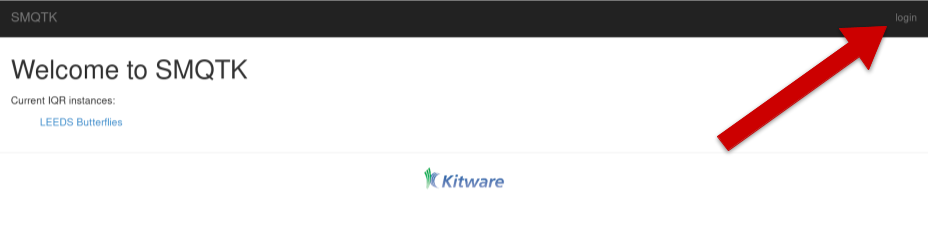
Click on the login element to enter your credentials
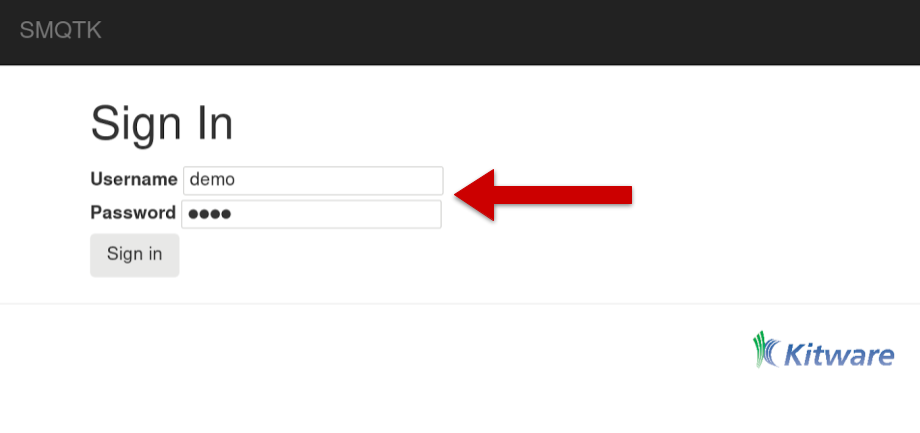
Enter demo credentials
Once you’ve logged in you will be able to select the LEEDS Butterfly link.
This link was named by line 8 in the runApp.IqrSearchDispatcher.json configuration file.
The iqr_tabs mapping allows you to configure interfacing with different IQR REST services providing different combinations of the required algorithms – useful for example, if you want to compare the performance of different descriptors or nearest-neighbor index algorithms.
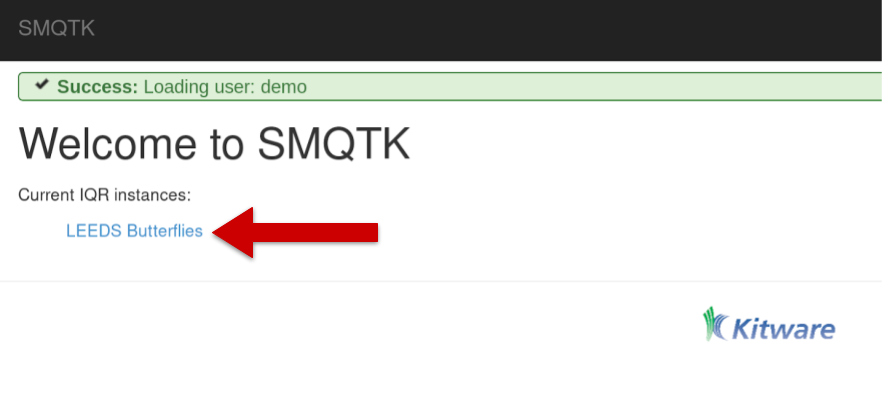
Select the “LEEDS Butterflies” link to begin working with the application
To begin the IQR process drag an exemplar image to the grey load area (marked 1 in the next figure).
In this case we’ve uploaded a picture of a Monarch butterfly (2).
Once uploaded, click the Initialize Index button (3) and the system will return a set of images that it believes are similar to the exemplar image based on the descriptor computed.
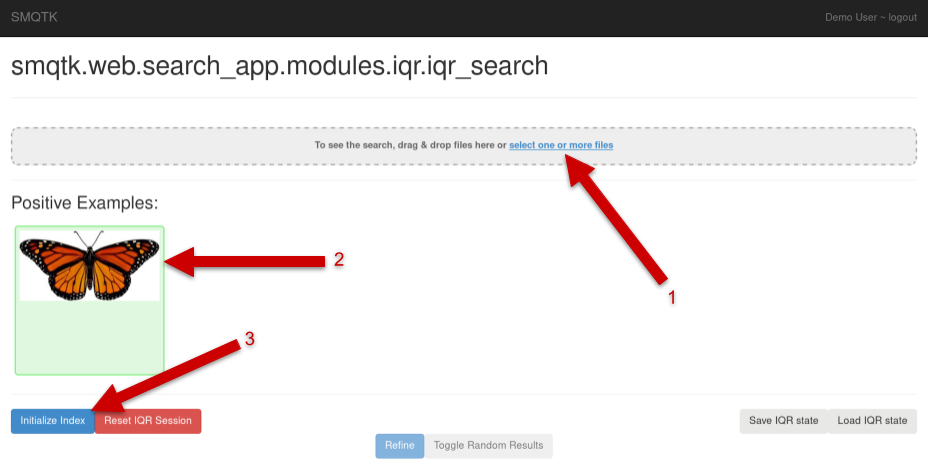
IQR Initilization
The next figure shows the set of images returned by the system (on the left) and a random selection of images from the archive (by clicking the Toggle Random Results element).
As you can see, even with just one exemplar the system is beginning to learn to return Monarch butterflies (or butterflies that look like Monarchs)
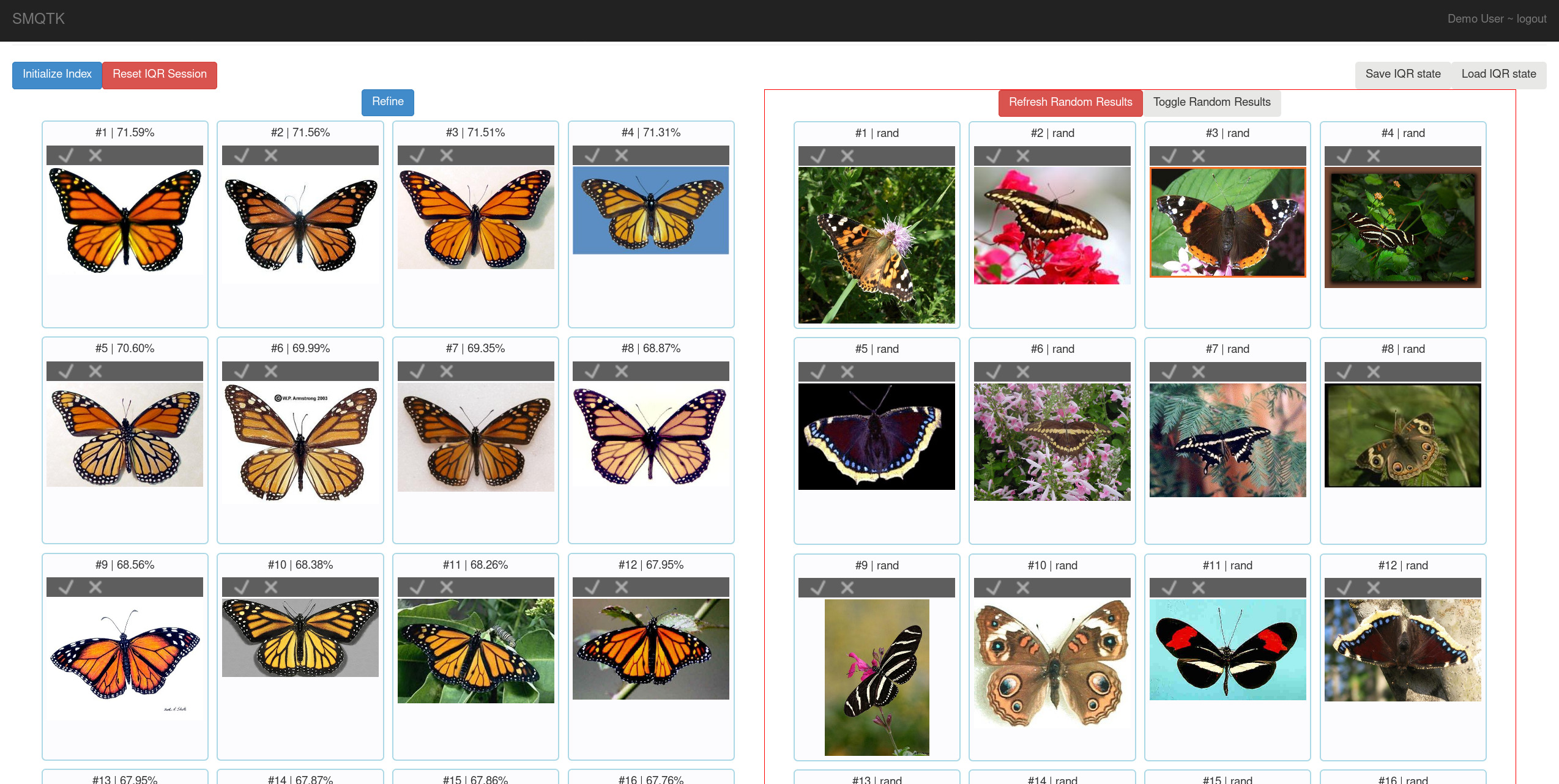
Initial Query Results and Random Results
At this point you can begin to refine the query. You do this by marking correct returns at their checkbox and incorrect returns at the “X”. Once you’ve marked a number of returns, you can select the “Refine” element which will use your adjudications to retrain and rerank the results with the goal that you will increasingly see correct results in your result set.
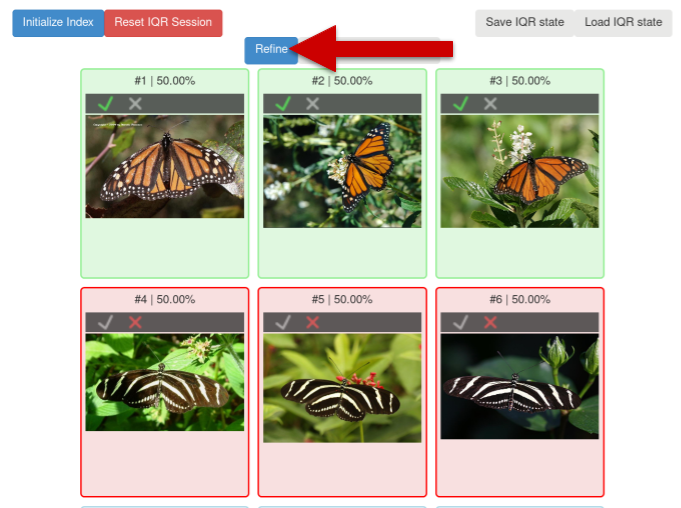
Query Refinement
You can continue this process for as long as you like until you are satisfied with the results that the query is returning.
Once you are happy with the results, you can select the Save IQR State button.
This will save a file that contains all of the information requires to use the results of the IQR query as an image classifier. The process for doing this is described in the next session.
Using an IQR Trained Classifier
Before you can use your IQR session as a classifier, you must first train the classifier model from the IQR session state.
You can do this with the iqrTrainClassifier tool:
usage: iqrTrainClassifier [-h] [-v] [-c PATH] [-g PATH] [-i IQR_STATE]
Named Arguments
- -v, --verbose
Output additional debug logging.
Default: False
- -i, --iqr-state
Path to the ZIP file saved from an IQR session.
Configuration
- -c, --config
Path to the JSON configuration file.
- -g, --generate-config
Optionally generate a default configuration file at the specified path. If a configuration file was provided, we update the default configuration with the contents of the given configuration.
As with other tools from SMQTK the configuration file is a JSON file.
An default configuration file may be generated by calling iqrTrainClassifier -g example.json, but pre-configured example file can be found here and is shown below:
1{
2    "classifier": {
3        "smqtk_classifier.impls.classify_descriptor_supervised.sklearn_logistic_regression.SkLearnLogisticRegression": {
4        },
5        "type": "smqtk_classifier.impls.classify_descriptor_supervised.sklearn_logistic_regression.SkLearnLogisticRegression"
6    }
7}
The above configuration specifies the classifier that will be used, in this case the LibSvmClassifier.
Let us assume the IQR session state was downloaded as monarch.IqrState.
The following command will train a classifier leveraging the descriptors labeled by the IQR session that was saved:
iqrTrainClassifier.py -c config.iqrTrainClassifier.json -i monarch.IqrState